
- Getting Started
- Account Setup
Getting Started
Account Setup
Create your PlotsAlot account and start chatting with your data in under five minutes.
Account Setup
Welcome to the first step on your PlotsAlot journey. This guide walks you through creating an account and logging in so you can start exploring data with confidence.
1. Sign-Up Options
PlotsAlot supports authentication through leading identity providers. You can choose between:
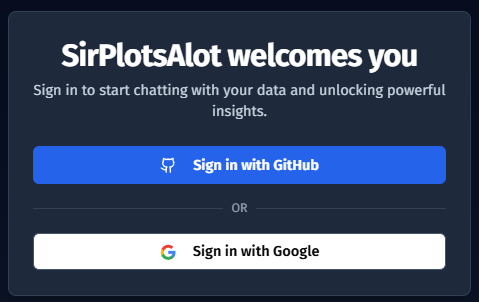
- GitHub – Perfect for developers or teams already collaborating on code.
- Google – Ideal for users who rely on Google Workspace or Gmail.
When you click Sign in with GitHub or Sign in with Google, you are redirected to your chosen provider. After granting permission, you are seamlessly returned to PlotsAlot, fully authenticated and ready to chat.
What Happens in the Background?
- A unique account is created for you in our system using your provider credentials.
- Your email address is verified through the provider.
- A secure session token is stored in your browser, keeping you signed in across visits.
2. Getting Started
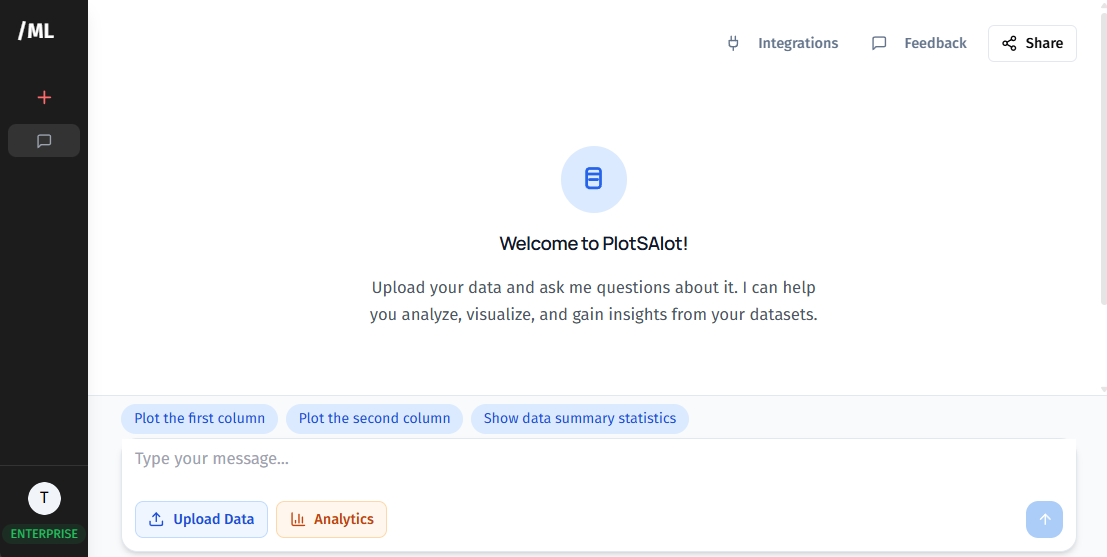
Once logged in, you are immediately taken to the chat interface where you can:
- Create new chats to analyze your data.
- Upload data files (CSV, Excel, JSON, Parquet, or PDF).
- Connect to databases for real-time analysis.
- Share individual chats with others using public or private links.
Your profile information (name and avatar) is automatically pulled from your chosen authentication provider.
3. Security Cornerstones
Your privacy underpins every feature:
- Secure Authentication – Session tokens are stored securely in your browser via NextAuth.js.
- Data Encryption – All data at rest and in transit is encrypted using modern standards.
- Least-Privilege Access – Read-only roles are enforced for database connections to prevent accidental data changes.
- OAuth Security – Your authentication happens through trusted providers (GitHub or Google); PlotsAlot never stores your passwords.
4. Next Steps
With your account created and logged in, continue to the next guide to upload your first data file and start analyzing with chat.
Need help? Use the Help button in the app to contact support, or explore our FAQ for common questions.