
- Getting Started
- Connecting Your Data
Getting Started
Connecting Your Data
Learn how to securely link databases and upload files so PlotsAlot can analyse them in conversation.
Connecting Your Data
Data is the lifeblood of PlotsAlot. By establishing secure connections or adding files, you give the assistant the context it needs to deliver powerful insights and visualisations.
1. Database Connections
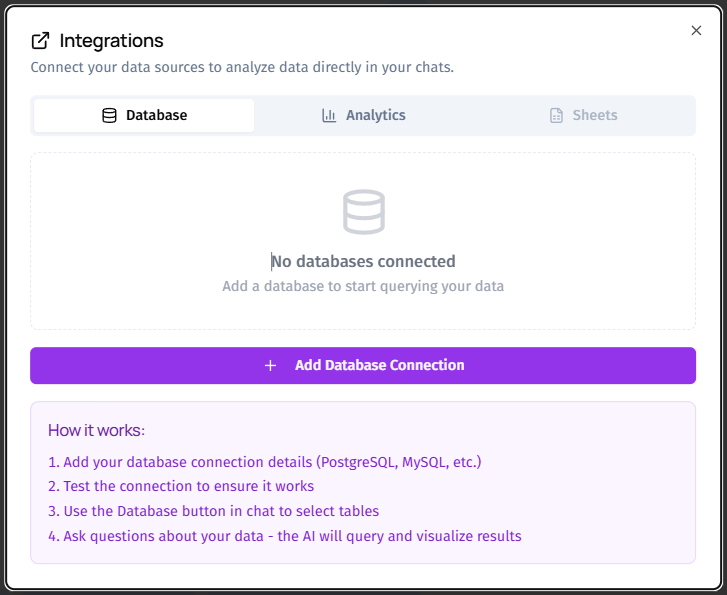
Supported Engines
PlotsAlot currently supports major relational databases. The most popular choice is a hosted or local PostgreSQL instance. Additional engines can be enabled on request.
Connection Process
- Open the Data Panel – From any chat, click Connect Database.
- Enter Credentials – Provide host, port, database name, username, and password. All fields are required to establish a secure tunnel.
- Choose Visibility – Decide whether this connection is private to you or shared with your workspace.
- Test & Save – Hit Test Connection. PlotsAlot validates credentials in real-time and confirms success. Once saved, the connection becomes immediately available for chat prompts.
What PlotsAlot Can Access
• Table names and column structures, enabling schema-aware suggestions. • Sample rows for context when generating data previews.
The connection is strictly read-only. PlotsAlot will never perform insert, update, or delete operations.
2. File Uploads
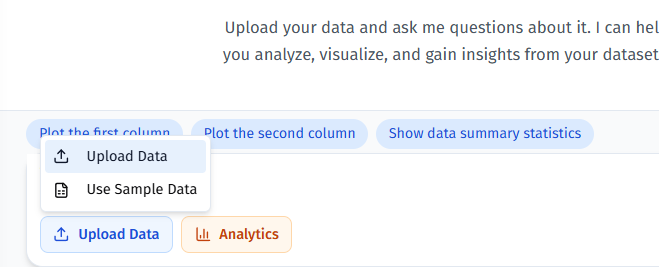
When your data lives in files rather than a live database, simply drag-and-drop them into the chat window or click Attach File. Supported formats include:
• CSV • Excel spreadsheets (single-sheet or multi-sheet) • PDFs containing tabular data • Image assets for contextual analysis (e.g., product screenshots)
Behind the Scenes
• The platform validates file size against your subscription allowance. • The first few lines of each dataset are sampled and presented to you for confirmation. • The assistant learns column names and detects data types (numbers, dates, text, etc.) to craft accurate responses.
3. Integration Tokens
PlotsAlot goes beyond traditional data sources by offering connectors to external services such as Google Analytics or Stripe. The flow is similar to database connections:
- Click Add Integration in the chat toolbar.
- Select the provider.
- Authorise using OAuth; you are redirected back once successful.
- PlotsAlot now has scoped access to the specific metrics or events you approved.
4. Best Practices for Secure Data Handling
• Use Service Accounts – When possible, generate dedicated read-only users for databases. • Rotate Credentials – Update passwords or tokens regularly. You can edit or remove connections at any time. • Limit Scope – Grant the minimum level of access needed for analysis.
5. Troubleshooting Tips
| Symptom | Likely Cause | Resolution |
|---|---|---|
| Connection test fails | Incorrect host or port | Verify server address and firewall rules. |
| Upload stuck at 99% | File exceeds plan limits | Remove large attachments or upgrade plan. |
| Missing tables in suggestions | Limited user permissions | Ensure the database user can list tables. |
Once your data is connected, proceed to the next guide to craft your very first conversation with PlotsAlot.